Launcher
RU

The whole Citeck platform —
one click away

The launcher downloads, configures and runs the open‑source low‑code platform Citeck on your computer or server. It watches and upgrades the services and, when you ask, packs all the data into one archive you can restore from. You just get to work.

All systems and formats

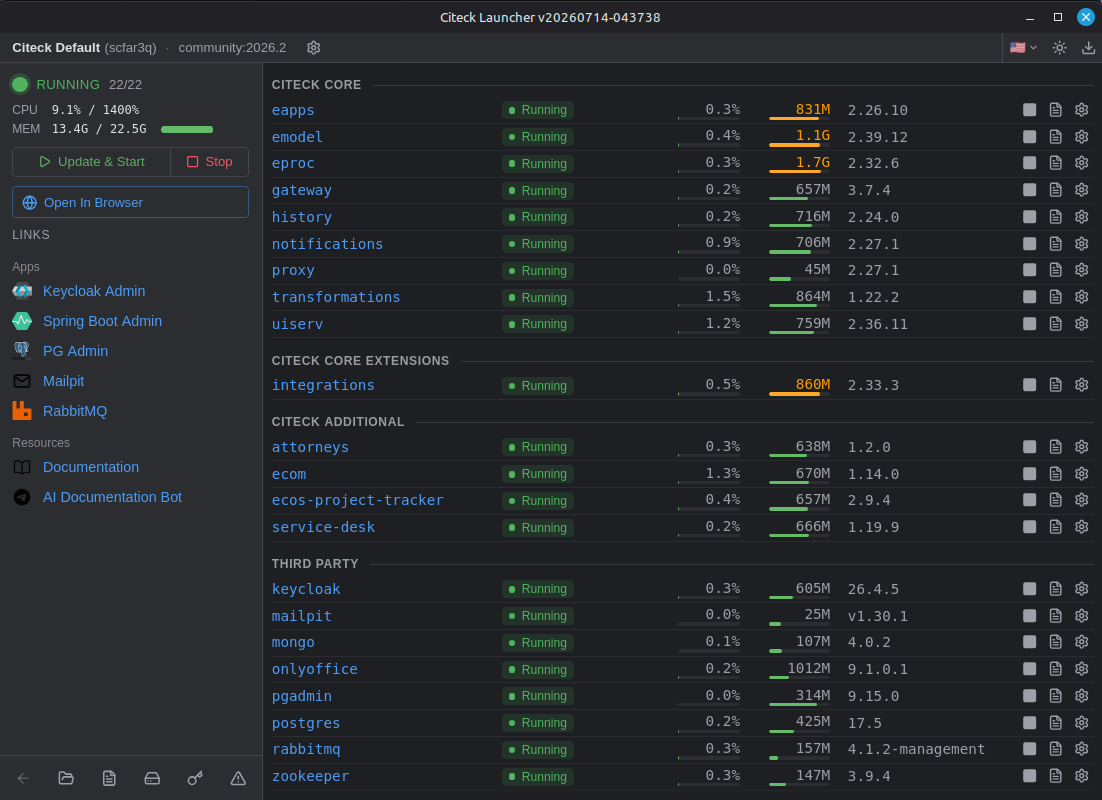
Citeck Launcher dashboard: every service of the stand is running
~28 MB
a single binary, no JVM
20+
services start automatically
3 OSes
macOS, Windows, Linux · amd64 and arm64
8
interface languages

What you run

Citeck — a low‑code platform for documents and processes

An open-source alternative to proprietary ECM/BPM suites that runs on your own servers. Draw process routes in the BPMN designer and configure document types without code. Users, roles and permissions come out of the box.

Contracts

Approval, signing, registry

Purchasing

Requests and approval routes

HR processes

Personnel documents and requests

Archive & portal

Electronic archive and corporate portal

Learn more about the platform at citeck.ru

Two ways to a working stand

Choose where Citeck will run.

On your computer

Desktop app

  1. 1Install Docker Desktop (Docker Engine also works on Linux)
  2. 2Download and install the launcher
  3. 3Press “Quick Start” and open Citeck in your browser

A regular desktop app, no command line needed. Citeck keeps running even after you close the window.

On first run the launcher downloads the images (several GB) and starts the platform. This usually takes 10⁠–⁠15 minutes. The services start automatically and in the right order.
On a server

Linux · VM · over SSH

  1. 1Install Docker on the server
  2. 2Run one command
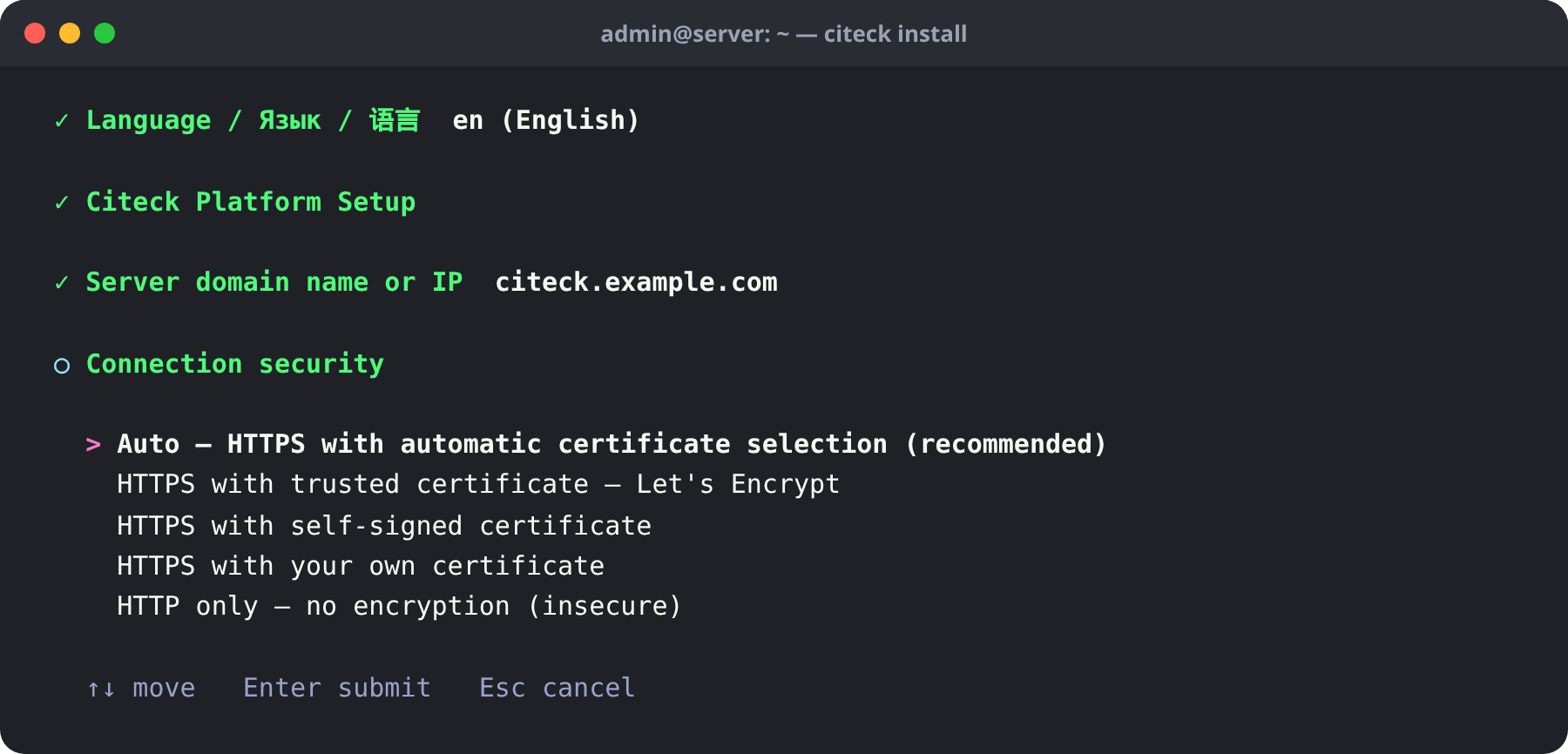
  3. 3Answer the wizard’s questions about the domain and HTTPS. Once the platform is up, the wizard shows its address and the admin password. Open the address in your browser and sign in

Server install command:

curl -fsSL https://github.com/Citeck/citeck-launcher/releases/latest/download/install.sh | bash

From then on, the citeck command runs the stand: status, logs, upgrades, backups.

On first run the launcher downloads the images (several GB) and starts the platform. This usually takes 10⁠–⁠15 minutes. The services start automatically and in the right order.

Features

The launcher takes care of operations

Self-healing

A crashed service restarts automatically, and the launcher records why it crashed.

Upgrade without fear

Upgrading PostgreSQL, RabbitMQ, ZooKeeper or Qdrant moves the data into a new volume. The original volume stays untouched, and rollback is one command.

Backup and restore

All volumes go into a single archive. Restore it on the same server or on another one.

HTTPS without pain

A Let's Encrypt certificate with auto-renewal, even for an IP address. You can also bring your own.

See everything

Status, CPU, memory and real-time logs of every service, in the app or in the terminal.

What it looks like

One screen, the whole stand

Dashboard: every service and its resources
Dashboard: status, CPU and memory of every service
The server setup wizard

Community or Enterprise

Community

Free

Fully open source. The platform core: documents, processes, BPMN, permissions.

Download

Enterprise

Licensed

Professional support and additional modules. Requires a license key issued by Citeck.

Contact us

The launcher installs either edition.Compare editions

What you need

  • DockerDocker Desktop on Windows and macOS, Docker Engine or Docker Desktop on Linux
  • 16 GB RAMfor Community · 24–32 GB for Enterprise
  • 50+ GB diskfor images and data

All downloads

Installers for every system are on the latest release page on GitHub. All releases on GitHub →

macOS: the app is not notarized by Apple yet. On first launch, open it with right-click → Open.

FAQ

macOS says the developer cannot be verified

The app is not notarized by Apple yet. Open it once with right-click → Open (or System Settings → Privacy & Security → Open Anyway); after that it starts normally.

Do I need Kubernetes?

No. The launcher only needs Docker: it starts and wires up every Citeck service by itself.

Do I need docker compose?

No. The launcher drives the containers through the Docker API itself, so you need neither docker compose nor compose files. Docker Desktop still shows every container of a stand as one group.

How do I move from launcher 1.x?

Install 2.x. On first start it brings over your namespaces and settings from 1.x. Secrets come over once you enter the master password. The data in Docker volumes stays where it is.

Where does my data live?

In Docker volumes on your computer or server. Nothing is sent anywhere. A backup of all volumes is saved as a single archive.

How is Community different from Enterprise?

Community is the free open-source edition with the platform core. Enterprise adds professional support and extra modules. It needs a license key. Compare editions

Run Citeck today

Free, open source, on your own hardware.

All systems and formats

Or install on a server with one command:

curl -fsSL https://github.com/Citeck/citeck-launcher/releases/latest/download/install.sh | bash
Server installation docs